How to use AI to turn your study notes into a practice quiz
Paste your study notes into a free AI app such as ChatGPT or Gemini and ask it to quiz you one question at a time. Our prompt makes it wait for your answer, tell you what you got wrong and list what to review. You get a practice quiz built from your own notes in about ten minutes. Then you check the answers against your notes.
What you need
| App | ChatGPT (its Study mode) or Gemini. We checked both on their help pages; any AI app can take pasted notes |
|---|---|
| Cost | Free. ChatGPT's help page says study mode is available across plans; Gemini needs you to be signed in |
| Time | About 10 minutes |
| You need | Your own study notes as text, or a file or photo of them, and the topic of your test |
Step by step
Step 1: Gather your notes and say what the test is
Copy your notes for one topic into one place. Note your level (for example, first year of college), the topic and the test date. Leave out names and anything private. Short, clear notes work better than a whole textbook.
Tip: ChatGPT's help page says that if it misses something in a file or image, paste the relevant text or name the page or section to focus on.
Step 2: Open ChatGPT's Study mode, or Gemini
In ChatGPT on the web, type @study in the message box, or select + and type study, then select Study from the suggestions. On a phone, select + and then Study. Study is not available in Temporary Chats, GPTs or Projects, so use a regular chat. In Gemini, go to gemini.google.com and click Add files if you want to upload your notes instead of pasting them.
Step 3: Paste your notes and this prompt
Change the words in [brackets], paste your notes under the prompt and send it. In Gemini, type in the text box at the bottom and click Submit. Gemini's help page suggests telling it what to create first, then the material you want to study.
Prompt to copyCreate a quiz from my notes below. I am [in my first year of college] studying [introductory biology] for a test on [Friday]. Ask me one question at a time and wait for my answer. After each answer, tell me if I was right, explain anything I missed in one or two lines and then ask the next question. Use [10] questions, mix easy and hard, and ask only about what is in my notes. At the end, list the 3 topics I should review. My notes: [paste your notes here]
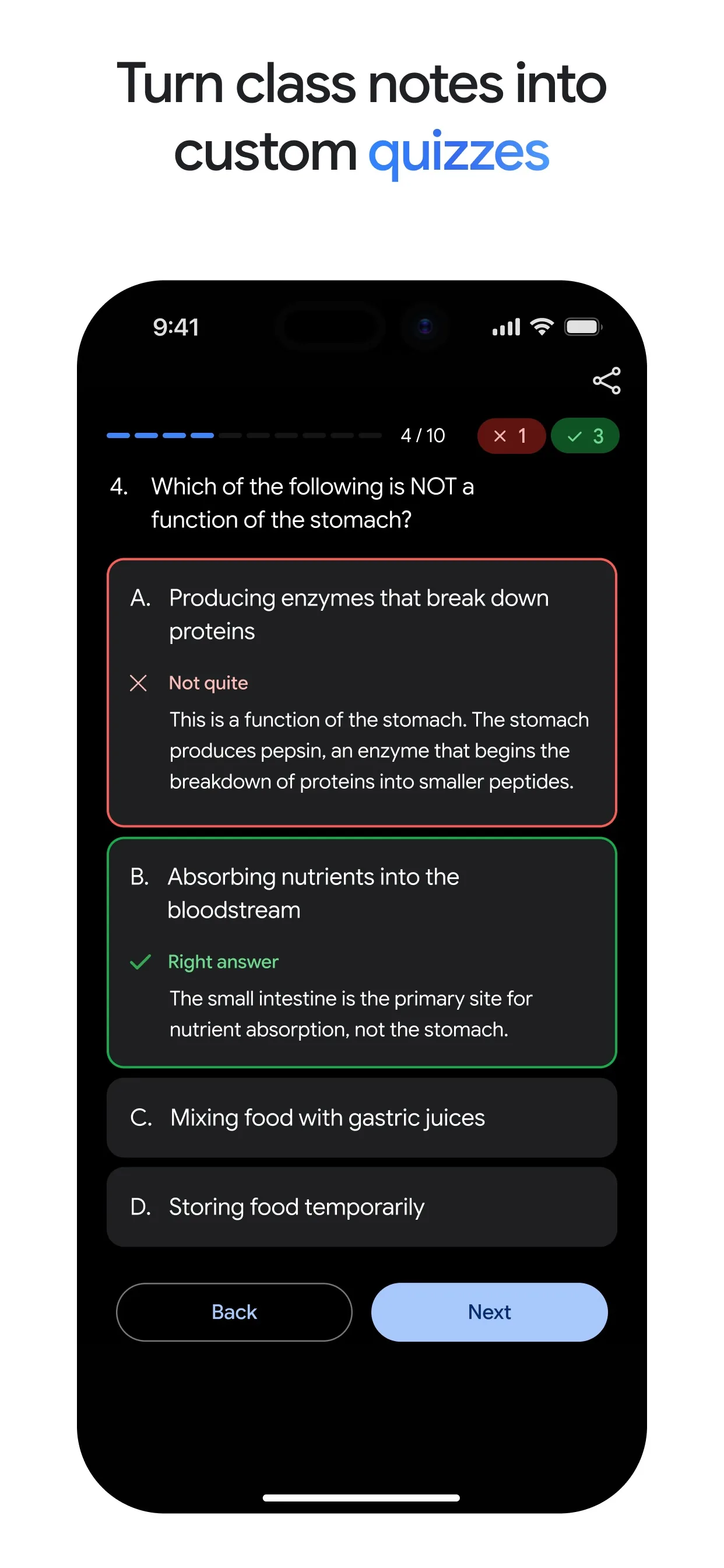
Image: Google Step 4: Answer from memory, then check
Answer each question before you look at your notes. Gemini's help page says you can click Hint for a clue, Next for the next question and Back for the previous one. When you finish, wait a moment: it shares your strengths and focus areas. Both help pages say the AI can make mistakes, so check a wrong answer against your notes.
Image: Google Step 5: Go again on the weak spots
Ask for a new round on only the topics you got wrong. In Gemini, click More questions when you finish a quiz. You can also ask for flashcards or a short study guide from the same notes.
Prompt to copyQuiz me again, one question at a time, only on the topics I got wrong or skipped. Use different questions this time. Then make 8 flashcards from my notes as a list: question, then answer.
What you get
Example answer from Claude on 10 Oct 2026, for made-up notes on photosynthesis. Shortened. Yours will be worded differently.
Common mistakes
- Reading the answers before you try. The quiz only works if you answer from memory first.
- Trusting every answer. AI can make mistakes. Check a surprising one against your notes or textbook.
- Pasting too much at once. Do one topic at a time so the questions stay on target.
- Using it on graded work. ChatGPT's help page says to follow your school's AI-use policies for graded work.
Questions people ask
Does this work in ChatGPT, Gemini and Claude?
Yes, because you only paste text. We checked the steps on the help pages of ChatGPT (Study mode) and Gemini (quizzes, flashcards and study guides). Claude works with the same prompt, but we did not check its menus.
Do I need a paid plan?
ChatGPT's help page says study mode is available across ChatGPT plans. Gemini's help page says you must be signed in to Gemini Apps. A free account was enough for the prompt in this guide.
Can I upload a file or a photo of my notes?
ChatGPT's help page says you can upload class notes, slides, a worksheet or a photo. Gemini's help page says to click Add files and choose the source material. If something is missed, paste the text instead.
Can the AI make flashcards too?
Yes. Gemini's help page lists prompts that start with Create a quiz about, Create flashcards about and Create a study guide about. ChatGPT's help page says you can ask for flashcard-style review.
Checked against
- OfficialOpenAI Help Center: Using study mode in ChatGPT
- OfficialGemini Apps Help: Create quizzes, flashcards, practice tests & more in Gemini Apps
- OfficialGemini Apps Help: Use Gemini Apps (start a conversation)
AI apps change their buttons often. If a step no longer matches what you see, email hello@openloopnews.com and we will update this guide.